


Radaris Caller Id Phone Lookup
3.571.00 Reviews
App Specs
- Version
- 1.2.4
- Updated On
- License
- Free
- Downloads
- 10,000+
- Developer
- Virtura Corp.
- Categories
- Communication
- Platform
- Android
Screenshots
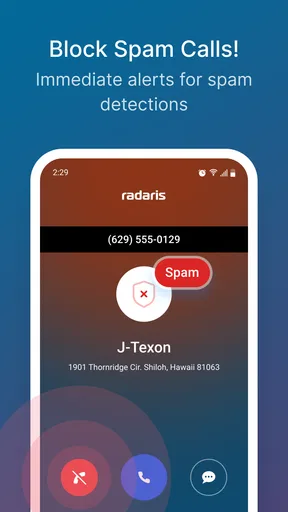
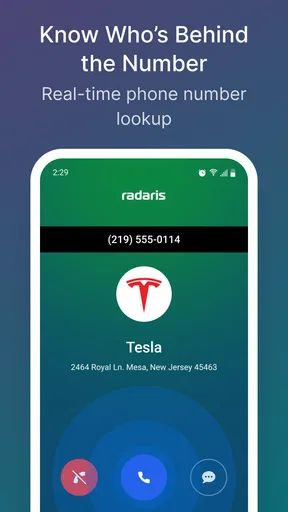
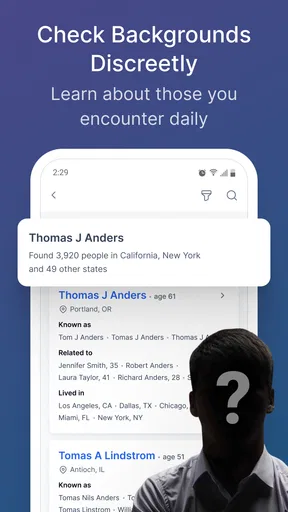
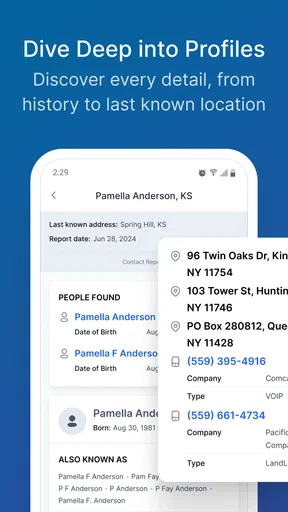
 Analysis by AppCompare
Unknown calls rarely arrive at a convenient moment. They interrupt dinner, break concentration during work, or create a small question that stays in your head: was that a person I know, a useful business call, or something I should ignore? I tried Radaris Caller Id Phone Lookup as a communication app built around that exact pause. Its purpose is not to replace your phone app, but to help you make a quicker decision about people and numbers before giving them your attention.
That sounds simple, and in practice the value is also quite focused. Radaris is most useful when you regularly receive calls from unfamiliar numbers and want more context before calling back. It can also help when you are trying to find a person or look up a number rather than relying only on memory, messages, or a general web search. I found the best way to think about it is as a layer of clarity around your normal calling routine, not as a complete communication system.
How Radaris fits into the way you communicate
The app comes from Virtura Corp. and sits in the communication category. It is free to install, with optional in-app purchases ranging from $3.99 to $84.99 per item. That combination matters because the basic decision to try it does not require an upfront payment, while some deeper or broader use may lead you toward paid options. I would approach those purchases carefully and decide first whether the lookup results genuinely solve a recurring problem for you.
Radaris has a Everyone age rating, which makes its presentation approachable for a broad audience. It was released on April 22, 2022, and the current version is 1.2.4. The minimum operating system is Android 7.1, so it can suit people using older compatible phones as well as those on newer devices. The app has passed the ten-thousand-install mark, with an average rating of 3.5 from roughly one hundred forty ratings and about seventy reviews. That is a mixed reception rather than an automatic recommendation, and it matches my impression: the idea is practical, but the experience depends heavily on how often you need this kind of information.
My first useful habit with Radaris was to treat every lookup as a decision aid. I would not open it simply because I was curious about every number that appeared on my screen. Instead, I used it when a call had a plausible reason to matter but did not identify itself clearly. That small change kept the app from becoming another source of distraction. The question became, “Do I need to spend attention on this call?” rather than, “What can I discover about this number?”
Finding context before answering
In an everyday scenario, imagine that you are waiting for a delivery, a repair appointment, or a return call from someone whose number you did not save. An unfamiliar call arrives while you are in a meeting. Answering immediately could interrupt the meeting, but ignoring it without context could delay something important. A lookup gives you a chance to make a calmer choice: answer briefly, wait for a message, or return the call later when you can focus.
This is where Radaris changes communication rhythm. Instead of allowing the incoming call to dictate your next action, you insert a short moment of evaluation. That moment is useful for people who get enough unknown calls to feel constantly reactive. It is less valuable for someone whose contacts are already organized and whose phone rarely rings outside their saved address book.
Worth Reading Before You Choose

EA SPORTS FC Mobile 26 Is a Bigger Football Game, but It Takes Time

Flipboard Shows What News Apps Must Do Beyond the Feed

Switching to Android Auto Means Rethinking Your Driving Routine

Google Calendar Makes a Crowded Week Easier to Manage

Ludo King Makes the Most of the Minutes Between Plans

Baby Panda World Brings Quick Play to Modern Phones, but Its Game Library Feels Busy
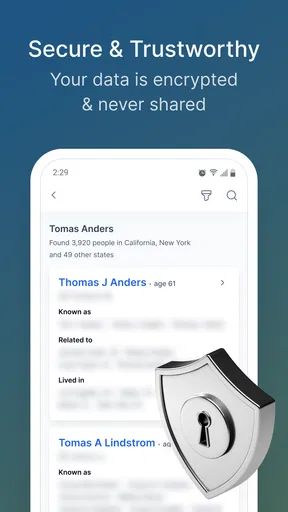
The people-search side can be useful in a different situation. If you know a name or have a number but cannot remember where you encountered it, a lookup may help you connect that loose piece of information with a person. I see this as most practical for sorting out old contacts, missed connections, or numbers that appear in a message thread without a clear identity. It is not a substitute for speaking directly with someone, and I would not treat a result as proof of a person’s identity without checking the surrounding context.
That distinction is important. A caller-identification tool can improve clarity, but it should not encourage overconfidence. Names and numbers can be shared, outdated, or associated with more than one person. My rule is simple: use the result to decide how cautiously to proceed, not to make a serious judgment about someone based on one screen.
Keeping conversations from becoming interruptions
Most phone apps are designed around the act of calling. Radaris is more concerned with the moment before the call becomes a conversation. That gives it a different role from a contacts manager or a messaging app. The usual alternative is to let the call ring, search the number manually, read whatever appears in a general search, and then decide. Radaris brings that lookup intention into a dedicated communication workflow, which is more convenient when the same uncertainty happens repeatedly.
The trade-off is that a dedicated lookup app adds another step to your routine. If you only receive an occasional unknown call, opening a browser or waiting for a voicemail may be simpler. If unknown numbers are a regular part of your day, having a specific place to check them can feel more orderly. I would choose Radaris over a general search when I want a repeatable process, but I would not install it merely to investigate rare calls.
One of the more useful ways to use it is before returning a call, not while the phone is ringing. A ringing phone creates pressure, and pressure encourages quick decisions. Looking up the number afterward lets you consider whether the call fits something you are expecting. It also gives you control over the timing of the conversation. You can return a call during a break, when your notes are available, or when you are prepared to say what you need to say.
For people who manage several parts of life through their phone, this separation between identification and conversation is valuable. A number can be relevant without being urgent. Radaris helps make that distinction visible, although the user still has to apply the judgment. The app cannot decide how much emotional or practical weight a call deserves; it can only help you begin with more context.
Attention, boundaries, and the cost of checking
I look at the cost of checking in two parts: the optional purchases and the attention a lookup can consume. Before paying, I’d decide whether I need occasional caller context or expect to use searches regularly, then weigh that against the specific option shown in the app. A clear stopping rule—check once, make a decision, and move on—also helps keep curiosity from becoming a habit.
When a lookup saves attention
There is a hidden cost to unknown calls: even when you do not answer, they can occupy your mind. You may wonder whether you missed an important person, whether the call will return, or whether you should search the number. A quick, deliberate lookup can close that loop. In my experience, the benefit is not just identifying a caller. It is reducing the mental space taken up by uncertainty.
That works best when I set a clear purpose before opening the app. For example, I might check a number because I am expecting a call from a service provider, or because the same unfamiliar number has appeared more than once. I avoid turning every missed call into an investigation. Without that limit, a tool intended to protect attention can become another reason to pick up the phone.
A practical routine is to group non-urgent checks together. Rather than interrupting work for every new call, I can review unfamiliar numbers during a planned break. This makes Radaris part of a boundary-setting habit instead of a constant notification companion. The app supports the decision, but the real improvement comes from deciding when communication deserves access to me.
The same idea applies to people searches. If I am trying to identify an old contact, I get better results from collecting the details I already know first: the name, the number, and the context in which I encountered it. Searching with a purpose is faster and less confusing than opening the app repeatedly with incomplete guesses. This is a small workflow change, but it makes the tool feel more useful and less like casual browsing.
Where caution matters
Radaris should not be treated as a shield against every unwanted call. A lookup may provide context, but it does not remove the need for ordinary caution. I would still avoid sharing sensitive information with an unexpected caller, even if a name appears familiar. If a call involves money, account access, urgent pressure, or requests for personal details, I would verify the situation through a trusted channel rather than relying on caller information alone.
Privacy is another reason to use restraint. Looking up a number can feel harmless when it is your own missed call, but searching for people out of curiosity can quickly become intrusive. I think the app is best used for legitimate communication needs: reconnecting with someone, clarifying a contact, or deciding how to handle an unfamiliar call. That boundary keeps the feature practical and prevents it from changing the way you relate to other people.
The paid structure also deserves attention. Because the app is free to start but includes purchases, I would not assume that every useful lookup is included without cost. Before committing to a purchase, I would check exactly what the selected option provides and whether it matches my actual need. Someone who only wants occasional context may find the free entry point sufficient, while a frequent researcher should think carefully about the total value rather than buying simply because a result feels urgent.
This is one area where a conventional alternative may be better. If your main concern is blocking nuisance calls, your phone’s built-in call controls or a dedicated spam-management tool may be more suitable than a people-search service. If your main concern is remembering contacts, a well-maintained address book is simpler. Radaris makes more sense when the problem sits between those situations: you need information about a number or person before deciding how to communicate.
Who will appreciate it most
I would recommend trying Radaris to people who frequently deal with unfamiliar callers, keep a changing list of service contacts, or need a clearer way to connect names and numbers. It can be especially helpful for anyone who feels that incoming calls control the pace of the day. The app gives those users a deliberate checkpoint between seeing a call and giving it their time.
I would be more hesitant to recommend it to someone who rarely receives unknown calls, already has excellent contact organization, or wants a pure call-blocking solution. It may also frustrate users who expect every number to produce a definitive answer. The most realistic expectation is not perfect certainty; it is better context for a decision.
Another useful trade-off is emotional. Some people feel calmer after identifying an unfamiliar number. Others become more anxious when they have an easy way to keep checking. If you tend to revisit the same lookup repeatedly, I would set a personal stopping rule: check once, note what you learned, and then choose whether to answer, wait, or ignore. That keeps the tool in service of communication rather than worry.
For families or shared devices, I would also keep the purpose clear. A lookup can help someone recognize a legitimate contact, but it should not become a reason to monitor another person’s interactions. The app works best when the individual using it is making decisions about their own calls and contacts. That is a quieter but important part of responsible use.
My verdict on the everyday experience
After using Radaris as a communication aid, I see its strongest quality as timing. It helps move a call from the category of “immediate interruption” into the category of “communication I can evaluate.” That shift sounds modest, but it can make a noticeable difference when your phone is regularly competing with work, rest, or face-to-face conversations.
Its weaknesses come from the same focused design. It is not a replacement for your dialer, contact list, messaging service, or complete spam-defense system. It also asks you to be thoughtful about paid choices and about how much confidence you place in lookup information. The app can improve clarity, but it cannot guarantee that a caller is trustworthy or that a result is perfectly current.
My recommendation is therefore conditional but positive. Install it if unknown calls and uncertain contacts are a recurring part of your life, then use it as a pause before responding rather than as a reason to investigate everyone. Keep your expectations practical, review purchase choices carefully, and combine its context with common-sense verification. For that specific job, Radaris is a useful way to reclaim a little control over when conversations begin.
In the end, the app’s real benefit is not simply finding a name. It is helping you decide whether a communication deserves your attention now, later, or not at all. If that decision is currently made by every ring and vibration, Radaris may give your day a more manageable rhythm. If your existing contacts and phone tools already provide that clarity, the extra layer may not justify the added step.
Pros
- Identifies many unknown callers using names
- locations
- and public records.
- Reverse phone lookup can help screen suspicious or unwanted calls.
- Search results may include associated people
- addresses
- and contact details.
- Useful for checking a number before returning an unfamiliar call.
- Simple search interface makes basic lookups quick to perform.
Cons
- Some information may be outdated
- incomplete
- or linked to the wrong person.
- Detailed reports may require a paid subscription or additional purchases.
- Results can vary considerably depending on the phone number searched.
- Public-record data may raise privacy concerns for people listed in reports.
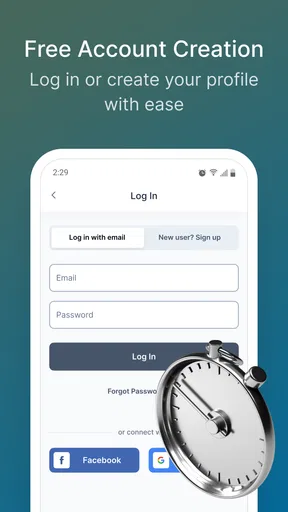
- Frequent lookup or notification features may require account registration.
FAQs for Radaris Caller Id Phone Lookup
What is Radaris Caller ID Phone Lookup used for?
Radaris Caller ID Phone Lookup is designed to help identify unknown callers and provide available public information connected to a phone number. Depending on the number and the data available, results may include a possible name, location, associated profiles, or other directory details. It is best viewed as an information and screening tool rather than a guaranteed way to confirm someone’s identity.
Does Radaris Caller ID Phone Lookup identify every phone number accurately?
No lookup service can identify every number with complete accuracy. Results depend on the quality, age, and availability of public records, and mobile, private, newly issued, or internet-based numbers may return limited information. You should compare the displayed details with other reliable sources and avoid treating a match as definitive proof, particularly when making important personal, financial, or safety-related decisions.
Is Radaris Caller ID Phone Lookup free to use?
The app may allow users to begin a search or view limited information without an immediate charge, but some features or detailed reports can require payment, an account, or a subscription. Pricing and available options may change over time, so review the current listing, in-app purchase screen, and billing terms before confirming anything. Also check renewal settings if a recurring plan is offered.
Does the app protect my privacy when I search for a phone number?
Before using Radaris Caller ID Phone Lookup, review its privacy policy and the permissions requested by the app. A search may be processed through online services, and information you submit could be handled according to the provider’s policies. Avoid entering sensitive personal details unnecessarily, and do not assume that searching a number is completely anonymous unless the service clearly explains its privacy practices.
Can I use Radaris Caller ID Phone Lookup to investigate or contact someone?
The app can be useful for screening unfamiliar calls, checking whether a number appears in public directories, or deciding whether a call may be legitimate. However, results should not be used to harass, impersonate, stalk, discriminate against, or expose another person. Do not rely on the service for employment, credit, legal, or emergency decisions, and contact authorities or your carrier when a caller presents a genuine safety concern.


